
How to setup

Smarters Pro iptv setup
Download and install IPTV Smarters Pro if you haven’t already done so on your device
Below is a link to the new version.
IPTV Smarters Pro Player on the Firestick, Android & IOS
Once installed, you will find it in the applications section of your device.
- Please place your order via the website.
- Once you receive your confirmation email, open IPTV Smarters Pro, select setup as TV and save.
- Select Connect with Xtream Codes API .
- API Enter name as Edge TV or TV Pro,
- Enter the username and password you received in the confirmation email.
- Enter the server URL provided in your order confirmation email
- Select Add User.
- Download each section… Live TV, movies and series.
- The guide information will take a few moments to download and install.
- You are ready.
APPRECIATE!

Formuler (Z8, Z10 and Z11)
Formuler Mytvonline is compatible with the following types of portals:
• XC: Xtreme Codes API (portal URL, username and password)
How to access it, depending on your MyTVOnline version:
MYTVOnline 1
• Menu >
MYTVOnline Portals 2
• Menu >
MYTVOnline 3 Connections• Menu > Content Manager > Content Sources
Connection Type: XC: Xtreme API Codes
• What you will receive from your service provider : Portal URL, User ID/Password,
e.g.
Portal URL: “http://YourProvidersPortalURL.com:port”
User ID: received in confirmation email
Password: received in confirmation eamil

- From the main menu, click Settings.
- Now click on Servers.
- Please place your order including your MAC ADDRESS during checkout.
- Use the Edge TV or TV Pro server name.
- Portal/Server URL: Provided in your order confirmation email.
- Once you receive your confirmation email and enter the portal URL, click Connect and the channels will load.
- Now everything is ready.

Smarters Pro IPTV Setup
In your device settings, select My device .
Select Developer Options and enable ADB debugging and installation from unknown sources .
If you don’t see Developer Options, select About in your Firestick settings, then select Fire TV Stick several times until it says you’re a developer.
Go back and complete step
Open Downloader and enter the code 224877 in the search bar, thenclick GO and install.
Select the configuration as TV.
Please place your order including your via the website.
Once you receive your confirmation email, open IPTV Smarters Pro, select setup as TV and save.
Select Connect with Xtream Codes API .
API Enter name as Edge TV or TV Pro,
Enter the username and password you received in the confirmation email.
Enter the server URL provided in your order confirmation email.
Select Add User.
Download each section… Live TV, movies and series.
The guide information will take a few moments to download and install.
You are ready. APPRECIATE!
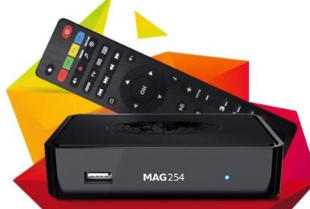
MAG device – 256 or newer
- Please place your order including your MAC ADDRESS at checkout.
- Go to Settings , then System Settings , then select Servers .
- Select Portals and under the Portal Name add Edge TV or TV Pro and for URL: provided in your order confirmation email.
- Once you receive your confirmation email and enter the portal URL, tap Reload Server
- Now you are ready. APPRECIATE!
IPTV Smarters application on your PC/MAC to stream our IPTV subscription.
- Go to a search engine and type “IPTV Smarter Pro”
- Find the official website:
- Download the new version.
- Once the file has finished downloading , click Run
- Windows will ask you for permission to open this file. Select yes
- The file will now begin the installation process. This should take a minute or two
- Once the installation is complete, launch IPTV Smarters. Click Add new user and select Upload your playlist or file / Add your login information for your IPTV service ( username, password and server URL provided in the email )
- You can now start watching content on IPTV Smarters!
VLC application on your PC/MAC to broadcast our IPTV subscription .

Download GSE IPTV Player from App Store
- Please place your order. Once payment is received you will be provided with the username and password by email .
- Once you receive your confirmation email, open GSE and select the 3 lines at the top right .
- Select the Xtreamcodes API
- Select the + at the bottom right to create a profile.
- Name = Edge TV or TV Pro
- Username = Your username provided in your order confirmation email
- Password = Your password provided in your order confirmation email
- URL: provided in your order confirmation email
- Select Add, then select the new profile and install epg.
- You are ready. APPRECIATE!

- Download and install TiviMate if you haven’t already to your device.
- Once installed you will find it in your apps section.
- Open TiviMate.
- Select Add Playlist.
- Select Xtream Codes Login.
- Enter the URL for the server found in the confirmation email of your order.
- Enter Username and Password provided in your order confirmation email.
- Select Next.
- Once playlist has loaded select Done.
- Allow a minute for everything to populate.
- You’re all set.